Private image converter
Lighter images. The same magic.
Convert PNG to WebP with no loss of quality, right on your computer. Your images never leave your device, keeping your conversions private.
Download for Windows (opens in a new window) Release notes on GitHub (opens in a new window)Free · Windows 10 and 11 (64-bit) · Version 1.0.0 · 20 MB
- Works offline
- No sign-up
- No uploads
Your images stay with you.
Privacy first
Most online converters, and many AI tools, upload your files to someone else's server to process them. Magic Luna does all the work on your own computer: nothing is uploaded, nothing is stored and no one else sees your images.
-
100% on your computer
The conversion happens from start to finish on your machine. The app never sends your images, or anything else, over the internet.
-
No AI in the middle
Your files are never sent to an AI service and are never used to train any model.
-
No account, no tracking
No sign-up, no ads, no analytics. Not in the app and not on this website.
-
Open source
The full source code is public, so anyone can check exactly what Magic Luna does. See the code on GitHub (opens in a new window)
Made for confidential work.
Client projects under NDA, unreleased brands, internal screenshots, archived records. When images are confidential, they shouldn't have to leave your computer to be optimized. With Magic Luna, they don't: no uploads, no AI and no third parties involved.
Lighter images, faster pages.
Performance
For anyone who designs or builds for the web, image weight is performance. Heavy PNGs slow down websites, hurt Core Web Vitals and use up your visitors' mobile data.
-
Lighter archives
Storing thousands of images? According to Google, lossless WebP files are on average 26% smaller than PNGs. Results vary. Source: Google (opens in a new window)
-
Trusted for documentation
Godot (opens in a new window), one of the most popular open source game engines, uses WebP for every image in its official documentation, with lossless compression whenever possible. Source: Godot guidelines (opens in a new window)
-
Same quality, pixel by pixel
Magic Luna uses lossless compression, so the image looks exactly like the original. See Google's study (opens in a new window)
-
Transparency kept
Transparent backgrounds stay transparent, just like in your PNG.
-
Works everywhere
All modern browsers display WebP images.
Simple from start to finish.
How it works
-
Select your PNG
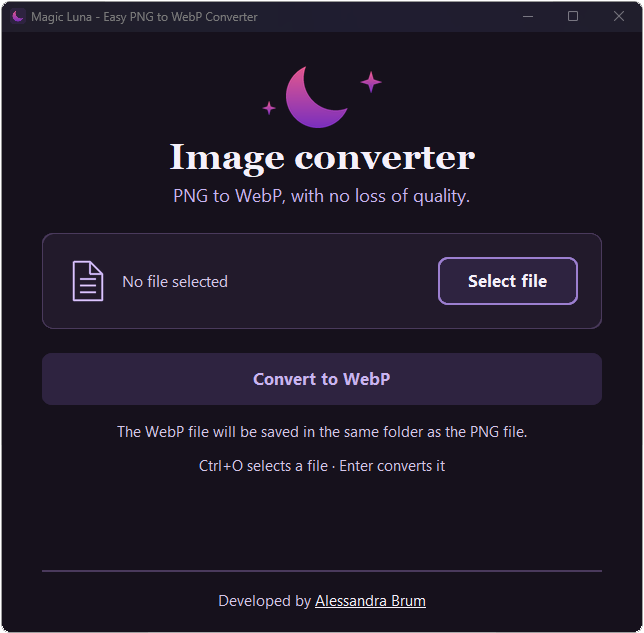
Click Select file, or press Ctrl+O, and choose an image on your computer.
-
Convert to WebP
Click Convert to WebP, or press Enter. It only takes a moment.
-
Find it in the same folder
Your WebP is saved right next to the original PNG, which stays untouched.
More formats on the way!
Support to other image formats convertion is coming soon. Feedback is appreciated.
Designed with accessibility in mind. Both the app and this website feature high-contrast colors, large text, and keyboard navigation.
Want to try it?
Free, light and private. Download it, open it and start converting.
Download for Windows (opens in a new window)Free · Windows 10 and 11 (64-bit) · Version 1.0.0 · 20 MB
Release notes on GitHub (opens in a new window)About the Windows security warning
Magic Luna is a small independent app and is not digitally signed yet. Because of this, Windows and your browser may show a warning the first time. This is expected and does not mean the app is harmful.
- If your browser says the file “isn't commonly downloaded”: open your downloads list, click the three dots next to the file and choose Keep.
- If Windows shows “Windows protected your PC”: click More info, then Run anyway. You only need to do this once.
Frequently asked questions
Is Magic Luna free?
Yes. It's free to download and use.
Do I need to install anything?
No. Download MagicLuna.exe and open it. Everything it needs is already inside the file.
Where do my images go?
Nowhere. Magic Luna reads the PNG and saves the WebP on your own computer. Nothing is uploaded or shared.
Is my original PNG changed or deleted?
No. Magic Luna creates a new WebP in the same folder and leaves the PNG exactly as it was. If a WebP with the same name is already there, it is replaced.
Does it work on Mac or Linux?
Not yet. Version 1.0 runs on Windows 10 and 11 (64-bit).
Which formats can it convert?
Version 1.0 converts PNG images to WebP. More image formats are coming in future versions, always converted locally, right on your computer.
Who made Magic Luna?
Alessandra Brum is a UX-driven front-end developer who cares about privacy and accessibility. Visit her website (opens in a new window)